5 Levels of AI Users in Your Company - And how to help them progress
 Dalibor Jovic

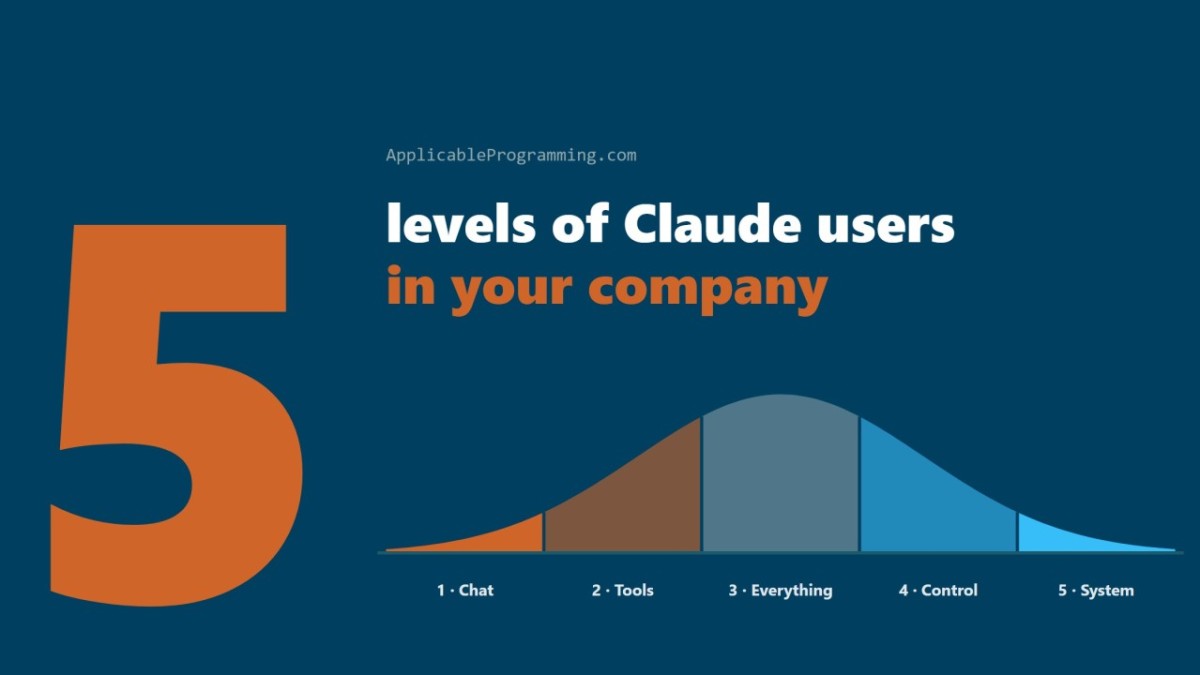
If you are responsible for AI in your company, your job is to get your colleagues to be better with AI. But you cannot give everyone same advice or task, because people have different of knowledge how to use AI, and its limitations.
What majority of us do, is go with the "gut feeling". That works, but business tend to run better on a strategy and a plan. So you need to be a bit systematic, and granual. You need to map out current users, and know how to help them progress.
This is what your result should look like, you should move people from lower levels closer to the top level. To make normal distribution as tight as possible.

It will always be normal distribution, and that is fine. You just want it compressed as much as possible
Most companies try to solve AI competance upskilling with "Learn AI with this course" course.
But they base existing competance by asking who is using Claude, who has the most tools, who burns the most tokens, and who sounds the most confident about AI.
That is not a map of progress. At best it is just a gut feeling.
I have seen people use AI every day and barely change how they work. I have also seen people with a simple setup get far more value, because they control the information AI works with.
The difference is context.
Context is everything Claude can see when it works on a task: your files, instructions, tools, decisions, process, and the history of the work.
The path is not from "uses AI" to "uses more AI."
It is from no context control to context that is relevant, understood, maintained, and reusable by others.
Here is the five-level map that you can use to map your current users, and know how to move them to the next level.

Level 1: The Chat User
The Chat User works in one chat.
They ask Claude questions about their work, copy-paste some text, get an answer, and move on. Every new conversation starts from zero.
They may get a small speed improvement, but Claude is mostly relying on its own built-in knowledge. It cannot see the spreadsheet, document, brief, or output they are working on.
This is good, but very limited.
How to spot them
- They retype the same prompt from scratch every time.
- They paste text into the chat instead of attaching the file.
- Good answers end up lost somewhere in the chat history
The move from Level 1 to Level 2: attach the real task documents.
Give Claude the spreadsheet. Give it the brief. Let it work with the actual output, instead of asking it to guess what that output looks like. Or even worse, copy-pasting back and forward.
You do not need a better prompt here.
You need to let the tool see the work.

Level 2: The Tool Collector
The Tool Collector has 7 skills, some MCP connectors, and about a browser full of tabs.
The setup looks impressive.
But if you watch how they work, they are still doing most of the process manually. They have borrowed pieces of somebody else’s system, but they have not defined their own.
A collection of 7 skills can be less useful if majority of work is still manual.
Because tools do not create a process.
They only make an existing process easier to run.
How to spot them
- They can show you their skills, but not their process.
- Most of those skills were built by someone else.
- The steps between the tools are still done by hand
The move from Level 2 to Level 3: map the process in smaller steps.
Take one repeatable task. Write down what happens first, what happens next, and what "done" looks like.
Then bring Claude into each step.
Do not try to automate your whole job. Pick one task and run it from start to finish, then run it again the next time it comes around.
The second run should be easier than the first.

Level 3: Everything everywhere, All at Once
This person often looks like the most advanced AI user in the company.
They have 24 MCP connectors. They use the largest context available. They give Claude access to everything, everywhere, all at once.
More data. More tools. More tokens.
But they cannot tell you what Claude is looking at right now, why it is looking at it, or which information matters for the task.
That is the boundary.
More context is not better context.
When Claude has to digest a huge pile of unrelated information, it has more chances to miss what matters. You may get an answer that looks polished, but it is built on noise.
If your context control is weak, AI helps you create confident-looking confusion faster.
How to spot them
- Every connector is switched on, for every task.
- They run out of tokens before the week is over.
- When a result is weak, they ask for a bigger model or more context
The move from Level 3 to Level 4: create a folder for the task or project, then remove irrelevant context.
Start with one project folder.
Put in the relevant files, instructions, tools, and information. Leave out everything else.
Then improve the context and instructions, not only the output.
If Claude gives you a weak result, do not spend an hour editing the text manually. Ask what was missing from the task setup. What did Claude need to know? What should not have been included?
You are training a different muscle here.
You are not fixing outputs. You are fixing the system that creates them.

Level 4: Context Under Control
At this level, the person has a project folder that makes sense.
They can tell you what is in it, why it is there, and which tools help with the work. They select relevant files instead of throwing everything into a chat.
This is where people become much more self-driven.
But there is still a problem.
Important decisions are often trapped in old chats.
Why did we choose this approach? What did we reject? What did we learn last week? What is still open?
The folder contains the work, but not always the memory of the work.
So every new session starts with someone explaining the past again.
How to spot them
- They can explain every file in the folder, and what they left out on purpose.
- They start a new chat when the old one fills up or starts to drift.
- Ask why they chose an approach last week, and they have to go find the chat
The move from Level 4 to Level 5: record decisions, reasons, findings, open questions, and next actions in the folder.
When you finish an important task, update the project memory.
Do not only write what changed.
Write why you chose it, what you rejected, what you still do not know, and what should happen next.
Your mind is for having ideas, not holding them.
The same is true for Claude. If the important knowledge lives only in a chat, neither you nor the next AI session can reliably continue the work.

Level 5: A Working System
At Level 5, the folder becomes more than a folder.
It has memory. It has operations. It has documentation. It has visible status. It has reusable instructions that somebody else can pick up.
The person is not just getting good answers from Claude.
They are building a working system around the work.
That system can include shared instructions, skills, helper actions, and a clear view of what is done, what is blocked, and what comes next.
How to spot them
- Decisions, status, and next steps are written down in the folder.
- Other people use what they built, every day.
- They talk about context and process, not about models
The big test is simple:
Can a colleague continue the work without sitting through an hour-long explanation?
If yes, you have a system.
If no, you have a talented person with a private setup.
Level 5 people are not only your best AI users.
They are your system builders.
Use them to create reusable ways of working that Level 1 and Level 2 users can benefit from.
At this level the risk flips, from AI used too little to AI output shipped without anyone reviewing it.

Where does your company sit?
Put yourself on this map first.
Then place the people in your company on it. Use names, or fictional characters if you want to keep it semi-anonymous.
Do not make the mistake of spending all your time trying to turn everyone into a Level 5 user.
Most support should go to Levels 1 and 2, because that is where the biggest gains are.
Level 1 users need help attaching the real work.
Level 2 users need help turning tool collections into repeatable processes.
Some people at Levels 1 and 2 are not waiting for help at all. They are quietly resistant, sure that the way they have always worked is the right way, and they usually say it as "I do not have time." It is rarely about time, it is about identity and the fear of change, so a push from their manager will not move them. What moves them is a trusted colleague showing Claude take one task they dislike off their plate, on their own data, in five minutes. Leave the part of the job they love alone.
Level 4 users can help those people. They understand enough about context control to guide others through smaller tasks.
Level 5 users should build systems others can reuse.
That is how you compress the gap across the company.
Not by telling people to use more AI.
By helping each person make the next move from where they already are.
Share this post with whoever is "AI responsible" in your company.
Categories: : AI, Technical leadership
"Applicable Bytes" newsletter
Get The Applicable Bytes here: Growth in programming, technical leadership & AI.